Keeps disconnectingAnonymous reviewerMetrics and history graphs are only available with own hub. Keeps disconnecting daily. 2
nice little thingAnonymous reviewerworks like a cham, only down side is when working standalone, clock is reset when power cycle4
Connects to Home Assistant via ThreadAnonymous reviewerI've just added a Thread router to my Home Assistant network via their ZBT-2 adapter specifically so I could use the new IKEA smart home kit. I had a lot of trouble getting my network set up initially, because I was using a cheap unreliable dongle. Once I switched over to their official kit, everything was a breeze - I have two ALPSTUGAs and am planning on getting two more.
The temperature and humidity seem accurate to within 1 degree / percent, and whilst I don't have professional CO2 measuring kit, they're at least within 5% of each other when placed in the same room.
My only improvement would be to expose the light sensor via Matter - you can control the display on/off via a switch, but not see the level it uses to set the brightness. Other than that, fantastic little bits of kit at an affordable price.5
Doesn't connect to matter hubs, need the IKEA hubAnonymous reviewerNo matter what you try, it won't work, saw many online reviews mentioning the same. Just fyi, it works standalone but no app connectivity if you don't buy the IKEA hub1
Easy to setupAnonymous reviewerOverall , it is good but if more mounting option will be great4
Neat piece of kitAnonymous reviewerThe Alpstuga is a nicely made device, displaying a good selection of environmental readings. It's a little disappointing that it cannot be set to display each reading sequentially, instead needing the button on top to be pressed to move through them. It would be useful if it was possible to do this, possibly using Home Assistant or some similar other facility.4
Third one’s a charmAnonymous reviewerAdding to my previous review, IKEA provided me with a third unit. No changes made to my network or connection method, but this one connected straight away to my Thread network via Apple Home.
Seems to be stable now but difficult to recommend something that based on my experience only has a 33.3% chance of connecting correctly. 3
Doesn’t connect via Thread/MatterAnonymous reviewerWell it functions as an air quality sensor, but the idea is it can connect to smart home systems too. No matter how many times I’ve reset, tried using 2.4ghz network, positioned closer to my Thread border router, it refuses to connect.
A trip back to Ikea to get my money back. Can’t recommend if you’re expecting to connect this to other systems.1
Excellent Air SensorAnonymous reviewerThe air sensor supports multiple functions and was very easy to connect to my home thread network, so far its been very stable with no disconnections.5
Compact, stylish, and a real eye-opener for night-time air qualityAnonymous reviewerWell done IKEA! This ALPSTUGA sensor is incredibly compact. It fits perfectly on a crowded bedside table without looking like a piece of lab equipment.
I bought this mainly for the smart features, but I was surprised to see how CO2 levels increase during the night when sleeping with the door closed. The levels climb much faster than I expected! It has been a real eye-opener and has actually changed how I ventilate my room before bed.5
Compatibility with Google Streamer via Thread - Yes!Anonymous reviewerI bought one to test. Everything connected to Google Streamer quickly and without problems. All parameters like CO2, PPM, temperature and humidity are available through Google Home. It controls the automatic Thermostatic Radiator Valve in the room, ensuring that the temperature is always stable and pleasant via automation in Google Home.5
Excellent price for CO2 sensorAnonymous reviewerThe main reason I bought this is the excellent price for a CO2 and PPM monitor, so even when it is sat on my desk standalone it is a useful reminder in the winter time to get a window open occasionally.
I eventually connected to Home assistant via Matter/thread with a sonoff usb dongle as the border router, reliability of connection is ok, the main problems I had was the initial setup of the thread border router. At the time of this review, the time display is not synchronised, and only reports the time since switch on.5
Poor reliabilityAnonymous reviewerThe device I have when it works is okay, comparable results to the other matter sensors on my network. However, it drops connection constantly, then reappears hours later.3
These are excellentAnonymous reviewerBought 3, and using in all 3 bedrooms. Light auto-dims in multiple gradients and is just right at night time to display clock. All sensors work great and device works with Apple Home and the IKEA app. You can use one, the other, or both. Seriously well done IKEA, these are better than I thought they would be and an excellent smart home addition.5
Affordable and surprisingly smallAnonymous reviewerConnect easily to Apple Home by pressing the "circle" button on the bottom which enables pairing mode (an circle on the display will start blinking), then tap "+" (top right) in the Home app, "Add Accessory" and scan the QR code on the bottom of the device.
Requires a Thread border router to connect to Matter systems, I have a HomePod Mini. This seems to have less range than Wifi.
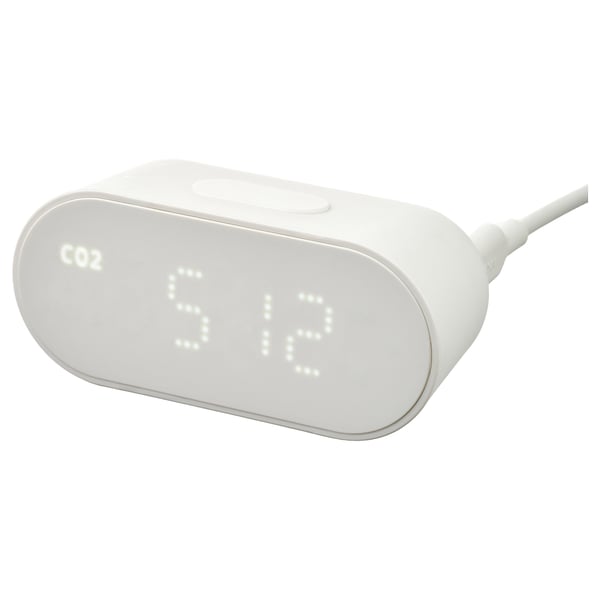
Can be used without a hub by pressing the button on the top to cycle through CO2, PM2.5, temperature, humidity and time.
The second button on the base toggles 24 and 12 hour clock on press, and Celsius and Fahrenheit on press and hold. The third enables time set mode (press a second time to swap to minutes and third to complete) and the fourth button changes the time (when time set mode is active) by press or hold.
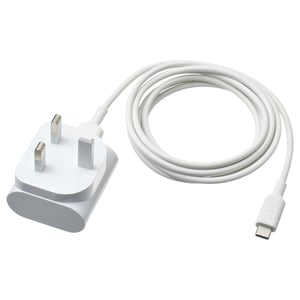
It does not include a USB C cable or plug. I used an old iPhone charger which was 5.0V 1A.
Only issue, when selecting in Apple Home app it shows all stats except temperature. Not sure why.5
Looks promising Anonymous reviewerBought this today from the IKEA store in Milton Keynes along with the Starkvind air purifier. Device is small and compact, on opening you get the monitor, however you need to find your own USB C 1A, 5W as it doesn't take batteries and isn't rechargeable. Also no connection instructions. On trying to add to the IKEA home smart app (I already have the dirigera hub and some smart lights connected) it wasn't on the list of devices in the app and couldn't be found by putting the hub into scan mode or scanning the qr code on the device. On exploring I discovered a bios update was available for the hub. On installing this although it still wasn't available in the app I was able to add the device by scanning the matter qr code on the base. After this it was plain sailing. Remember to connect the device on a 2.4GHz IoT network, or temporary switch off your 5GHz signal, otherwise it won't connect.4