






In addition to our growing range of smart products, you can actually add other electrical devices to DIRIGERA thanks to a wireless outlet. You put it between the wall socket, and for example the coffee machine or the iron, which then becomes a part of your smart home. “The whole idea with DIRIGERA has been to create a simple system to both install and use. We have more than 75 years of experience in creating a better everyday life at home, and now we have made it smarter by adding technology.”
DIRIGERA Hub for smart products, white smart
Price $ 139.99
How to get it
Checking availability...Available services
Collect 139 points with
It's OK to change your mind
Return within 365 days for a full refund*. Learn more
Low Price Guarantee
Price drops? Get the difference back within 90 days with IKEA Family
More ways to pay
Checking payment options...
DIRIGERA
505.034.14With more than one smart product from IKEA, the DIRIGERA hub, together with the IKEA Home smart app, brings the most benefits to your smart home. Improving the IQ of your home makes life itself smoother.
Product features
- Works with IKEA smarthome products
More information
Material
ABS plastic
Care
Wipe dry with a clean cloth.
Assembly instructions
DIRIGERA Hub for smart products505.034.14
DIRIGERA Hub for smart products, white smart
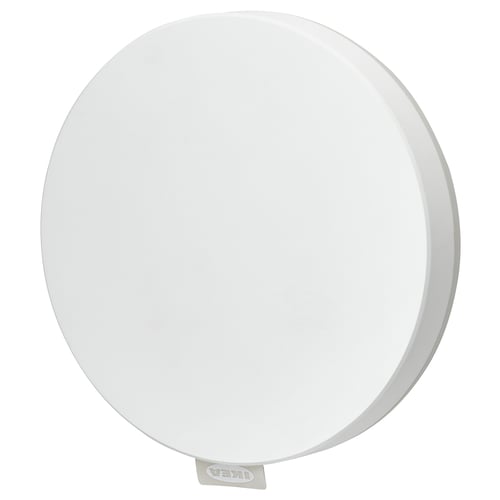
DIRIGERA hub is the heart of a smart home as it enables you to connect and control your smart products in the IKEA Home smart app.
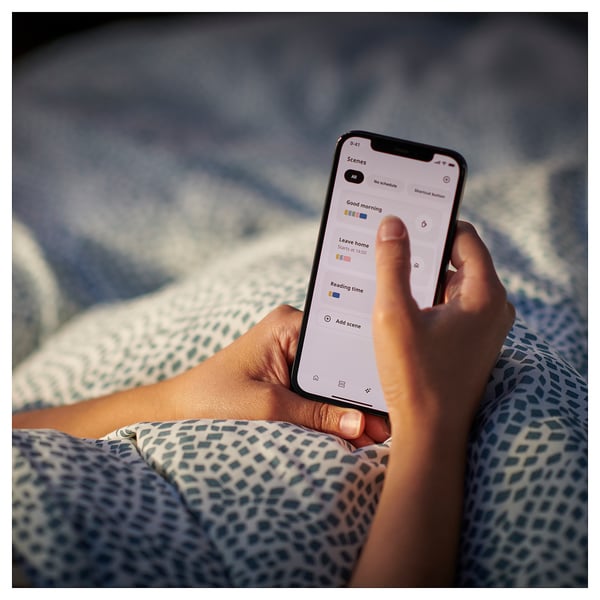
Picture yourself being able to wake up, dim the lights, raise your blinds, and listen to some music - all without having to get out of bed (or having to rewire your home).
You can easily keep an eye on your home even when you're away using the IKEA Home smart app, for example to check if the coffee machine is switched off and to turn lights on or off.
All our smart products work independently. Adding them to the hub opens up new ways to control and customize your home – with extra functions and features when you combine two or more products.
DIRIGERA hub requires a Wi-Fi network and connects to your router with the provided cable.
To use the hub to get going with your smart home, download the IKEA Home smart app, where you’ll be guided step-by-step.
You can control your smart home using one or multiple mobile and tablet devices - just download the app to each one.
If you want to use a voice assistant, you can connect to Amazon Alexa, Apple Home, or Google Home through integrations in the IKEA Home smart app.
DIRIGERA hub is a Matter bridge. This means that all products in the IKEA Home smart system can use the hub as a bridge into a Matter system.
DIRIGERA hub is a Matter controller. This means that all supported Matter products can be connected to the hub.
The IKEA Home smart app is available on the App Store (iOS 16.4 or later) and on Google Play (Android 10 or later).
Material
ABS plastic
Care
Wipe dry with a clean cloth.
Assembly instructions
DIRIGERA Hub for smart products505.034.14
- 505.034.14
1 × DIRIGERA
Hub for smart products- Width: 6 ¼ "
- Height: 2 ¼ "
- Length: 6 ¾ "
- Weight: 13 oz
Reviews
It’s good…?JoshuaIt works, and for the price of the bulbs, it’s hard to beat. For basic smart lighting, I really can’t complain. I was hesitant because the online videos and reviews of this product. It works great so far, but will certainly update my review if anything changes!
Stop working after a yearJuanIt stopped working after a year and now I cannot control my blinds. I need a ladder everytime I want to operate them.
This won’t detect a sensor next to it.JohnI tried half a dozen times to pair sensors with it with terribly hit and miss results. It was so unreliable I resolved to seek a matter hub with a better track record and no requirement for a hard wired connection.
Terrible experience.RandyThis and the sensors required multiple attempts to connect with Alexa and even once successful, they won't stay connected. You can't add anything but ikea devices to the hub so this means no routines through the hub unless you replace your smart devices with ikea brand. Customer service was nice and helpful with my return of all items through the mail but very slow process. Several calls and still waiting for return credit. If using Alexa, I would NOT recommend ikea matter devices.
Would not connectKevinI have two different Wifi networks/services and neither would allow me to connect the hub. I research solutions for hours on the web without resolution. It shouldn't be that hard ... I have the Philips Hue hub and it set up fine. Had to return the product unfortunately.
Did not connectPatriciaReview not entirely possible since the item would not connect to the water leak sensor. The water link sensor connected immediately with the Amazon Echo (Alexa) device, so this hub was not required. Returned
Cannot coexist with Home Assistant AraThere are many issues with this hub with regards to they Thread Border router implementation that will cause you other non-Ikea Matter devices to randomly become unavailable in Home Assistant.
This hub will become a OTBR in your network and there is no way to disable it, and die to its poor implementation, it will interfere with your Thread network. This is well reported by such users.
Does not natively work with Alexa or Google Home any longer.KimberlyYou will need an additional matter hub now to set this up to work with Google Home, Amazon Alexa and Apple Home. These Integrations were removed from the Home Smart app. I discover this after purchasing to replace our Tradfri hub. Set everything up with our bulbs and plugs, and then started trying to integrate with our home voice controls. All tech setups directed us to the Integrations section, in the app, but the only option was matter and we don't have a matter hub. So upsetting and very false in their item description. We had a few new devices we wanted the new hub for to be able to use voice controls, but honestly could have done without. Not even sure we could set the old system back up, cause the pairing of controllers and 40+ bulbs would be a major undertaking.
Easy setup but compatibility issuesMichaelThe setup of the hub was easy. Unfortunately, it was unable to "find" the water leak sensors I bought from Ikea. Luckily the sensors work with my Alexa Show; so, I'll be returning the hub.
huge price increaseCalebWorks great, but this hub used to be $70
Sunrise feature doesn’t workEwelinaBought this with some of the smart bulbs so I could use the sunrise feature as a wake up light in the winter. The lights are supposed to fade on slowly and mimic a sunrise - unfortunately they just turn on immediately to full brightness instead. Super disappointed that this feature doesn’t work (and apparently hasn’t for years) and they haven’t fixed it.
Wow these got expensive! But it's worth it to have blinds that acutally do what you want them to do.JosephWhen I purchased my Ikea FYRTUR blinds, the Trådfri gateway was all that was available. If you have a Trådfri and it has been a constant exercise in frustration to JUST MAKE YOUR BLINDS WORK, it's time to bite the bullet, pay the $109 for the Dirigera, and make your life easy.
One of the many reasons you want a Dirigera is that the setup is EASY, the way it always should have been. Instead of pairing remotes to blinds and repeaters, everything is paired to the gateway. If you want to change which blind(s) a remote works, you go in the app and just reassign it.
Easy and Peasy. And literally EVERYTHING about the experience is better with the Dirigera and the newer app, which is for the Dirigera gateway only.
Things that Dirigera does that Trådfri does not:
1. Actually work consistently on a very basic level.
2. Let me just pair stuff one time and then it works.
3. Control my blinds FROM ANYWHERE instead of just while I'm on my network.
Yes, I wish I'd had this one all along.
Great intro to smart homeJimI love the data that this device gateway provides.
And I wish you could control plugs/lights based off of conditions the Vindstyrka provides, IE if the TVOC values rise to X, then enable a tretakt to be "on" (in this situation: the tretakt plug is powering an exhaust fan).
I would like to see more granularity/control.
No easy migration from Trådfri hubDominikIt’s been about three years that the Dirigera hub has been out and has replaced the Trådfri hub. One would think that the home automation development engineers had come up with a convenient way to migrate all configured home automation components from the Trådfri hub to the Dirigera hub. Unfortunately, that’s not the case. In online forums I see people referring to its taking several hours to re-pair components with Dirigera. In my case this would also entail additional tedious work in the Apple Home app.
No thank you! The unit I purchased will go back to IKEA for credit.
Don’t waste your moneyAnonymous reviewerIKEA states that this hub can handle over 100 connections to smart home devices at the same time. Mine refused to add accessories after reaching 32. IKEA customer service states that because “over 100” is not an exact amount, this performance is not considered an issue. Furthermore, they state that the item is sold with no guarantee of warranty of any kind. Don’t buy this or into any of Ikea’s smart home products unless you want to be shelling out money to IKEA for additional unwarrantied hubs as you add devices.
Your IKEA lighting, sound, and air filtration just aren't smart without it.SeanLove that the hub is matter compatible or the future of the smart home and that it allows me to set automations such as opening my blinds at a specific time each day.
works well so farMathewSet up was easy enough. Just a simple walk through with the app and press of a button got everything going. Its appearance is best described as unoffensive nor interesting; just a plain white puck. A black version would've been a nice option. I like it's powered by USB which allows better flexibility. The app is ok, wish it showed detailed power use graphs and faster outlet power monitoring with decimal values for the wattage, but it all gets the job done.
Tough to keep goingSteveWas tough to connect but overall not bad.
Not cool at all yoTheodoreIt's nothing but a common ZigBee hub. Ikea is playing gatekeeper with it using software. You shouldn't even need to buy this if you already have a ZigBee hub, but they've designed it to be less than user friendly if you don't buy this. So, you see, it's really not cool for a company to do this kind of thing, but here we are. I am a computer science college graduate, so I can easily use custom software to defeat this, but a lot of people cannot. I feel like it's predatory.
Great! Even worked with some older lightsJoshuaThe setup was giving me a bit of trouble at first but all I had to do to get past the trouble was quit and relaunch the phone app after the unit connected to my network. After that it worked great. It even worked with some remote Ikea lights and remotes I got around 2017. Remember, this unit like all wireless home light units needs to always be connected to your wifi router via ethernet cable and also to power. Luckily my wifi router has a USB port that can provide power to it so I didn't have to run additional power cables to it. If you set up an account you can control your lights through the app from anywhere via the internet using the phone app. Sharing access with multiple users on different devices was also easy to do. Setting up timers via "scenes" was easy but keep in mind you have to create separate "scenes" for lights on and lights off.
Customer reviews
3.6Average rating
774Reviews
3.6Average rating
774Reviews
Accessories for DIRIGERA
Related products
Explore more options
Recommended for you
Story
Connect and create some magic
You have surely asked yourself, a bit stressed and on your way from home, “did I really turn off the iron?” Or wished that the lights were on when you get home late? With DIRIGERA, our hub for smart products, you can easily connect and control everything from irons and lamps to air purifiers and speakers.
“But the real magic happens when you combine the different products to what we call a Scene. Then you get fantastic functions,” says Rebecca Töreman, who has worked with smart products at IKEA for several years. Her mornings now start softly with the help of a routine she has created herself in the app. “Just before I wake up, the blinds go up, my bed lights are slowly lit, and the speakers turn on my playlist with soft music. The air purifier has given me the best possible air during the night and goes from night mode to auto mode. I can’t imagine a better start of the day.”
For a smarter everyday life
Continues to develop
When you buy a piece of furniture or any other product from IKEA, you expect it to be fully developed. But we can reveal that DIRIGERA actually becomes better and better with time – without costing you anything extra. “We continue to update the app and develop new products and functions that you connect to your smart home – so you can have a little more magic in everyday life.”.
Function solution
Connect and create some magic
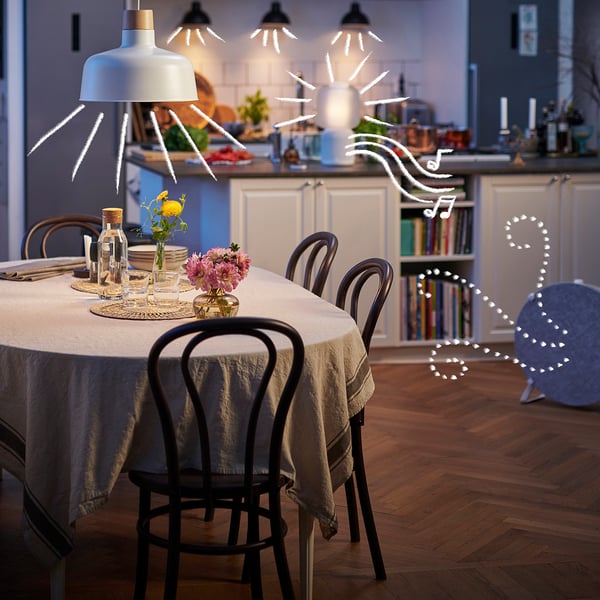
With DIRIGERA, our hub for smart products, you can easily connect and control everything from lamps and blinds to speakers and air purifiers directly from an app on your phone. It’s smart and smooth, but the real magic happens when you combine different products to a preset Scene. Then you can create your own routines that frame that perfect dinner party, help you unwind in the evening or wake you up with a pleasant light and soft music.